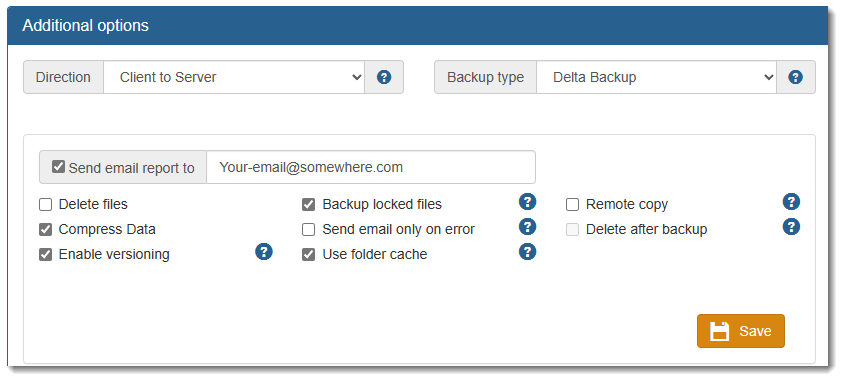
•Direction: How the backup program is configured to operate. (before making changes see Direction Concepts)
oThe default is Client to Server (normal backup).
oTwo-way sync: synchronizes files at both locations if a file is more recent in one of the location the other location file is deleted/overwritten with the most recent file.
oServer to Client: direction required to restore files. Users can also restore files via the WEB interface.
•Backup Type:
oDelta Backup: only transfers the changes in files greatly reducing the Internet bandwidth requirements.
oSimple Copy: Copies the file deleting the file at the destination location.
oSmart Backup: auto determines which option Delta or Simple Copy is the most efficient method in transferring each individual file. In some circumstances it is faster to do a Simple Copy versus a Delta backup.
•Backup Locked Files: backup files that are in use via the Microsoft VSS feature. (you should have this option turned ON or some files will not be backed up)
•Send email reports to: the addresses listed in the field will receive backup reports (if more than one email, separate each email address using a comma) This option will provide you a backup report each time a backup is run. (see Send email Report to)
•Delete Files: will delete files on the backup server which no longer exist on your computer. IMPORTANT: if activated you may not be able to restore a file deleted by mistake since it may have already been deleted on the backup server. (you should have this option turned off).
•Compress Data: if selected this will cause your backups to be more efficient and faster.
•Enable versioning: This option will keep versions of your files based on the backup package you purchased. Backup Locked Files: This option is for Windows users and allows the backing up of files in use at backup time such as Outlook files, databases, or other such files. It uses the Microsoft VSS service. (you should have this option turned ON).
•Send E‐mail only on errors: Default not checked.
•Use Folder cache: default checked, significantly speeds up backup process. (see Use Folder Cache)
•Remote Copy: detect if a previously backed up file has been moved/copied to a different folder. When such a file is detected, a similar operation is performed on the server side without transferring any data over the network.
•Deleting files after backup: When this option is enabled, the backup client will delete files on the client after they have been suc?cessfully backed up. Dangers in enabling this flag Enabling this option can be very dangerous since it has a potential of deleting important files from the machine (you should have this option turned off). (see Deleting files after backup)
•Ransomware protection: Activated by default it protects your backup copies from potential ransomware corruption. If Accra Backup detects a potential ransomware activity the backup will not permit the folder or affected files to be backup.