|
Ransomware is a type of malicious software from cryptovirology that threatens to publish the victim's data or perpetually block access to it unless a ransom is paid.
Ransomware is a menace that can wreak havoc to any company. Although backed up data through Accra Backup Services can save your day, often users do not find out about the attack until it is too late. |

Consider the following example:
•You have configured Accra Backup to backup every night around 7 PM
•A ransomware hits around 4:45 PM on a Friday, fifteen minutes prior to close of business
•By 6:30 PM every important document and file is now encrypted
•A backup runs at 7 PM, which contaminates previously backed up data since it will replace/update the old file with the new ransomware encrypted file.
Although versioning along with delete retention features can be used to restore original files, Accra backup Service introduces another feature that can detect an attack and skip the backup if ransomware attack is detected, preventing a good set of backup from getting corrupted as well.
IMPORTANT
1) Ransomware Protection (RWP) is designed to work when backup direction is either Client-to-Server or Two-way-sync. It does not work if the direction is Server-to-Client.
2) The protection only works as long as the bait file is not deleted or modified. if you delete or change the bait file your backup will no longer run. To reset or replace the bait file with a valid file and restart your backups see below How to Fix a Ransomware Alarm.
|
How does Ransomware Protection (RWP) Work
Accra Backup creates a dummy file, called a bait file, in every top-level backup folder on the client's machine. This file get downloaded from the Accra Backup Server and will have the same size and last modified date - meaning the copy on the client's machine will be identical to the copy on the server.
Before backing up a top-level folder, Accra Backup will match the file on the client PC to the copy on the server. If the files match, the backup proceeds. If the files do not match, the backup will not proceed. An error gets logged if the file does not match, allowing the user to take corrective measures.
The bait file used is called: RansomwareBaitFile.jpg and will be placed in each top level folder being backed up.
Common Reasons For False Alarm
Consider the following reasons if a false alarm is triggered:
•Reason 1: A user mistakenly modifies or deletes the bait file.
•Reason 2: The background service running the Accra Backup Client is unable to create the bait file. By default, the background service runs under the operating system "SYSTEM" account. Depending upon the permissions on your machine, it is possible the operating system will not let the "SYSTEM" account create a file.
Two common folders that this can happens on are the user's Desktop, and Music folder which are considered private folders and the operating system will not allow the SYSTEM account to create a file.
How to Fix a Ransomware Alarm
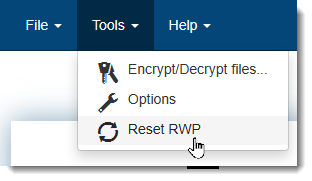
To fix, open the Accra Backup Client and click Reset RWP from the Tools menu. Then, run a full backup using the GUI (manual backup), which will create the bait file. Once the bait file is created, subsequent backups won't trigger the ransomware alert.