Encryption
Encrypting files has its pros and cons. The benefit is obvious: the only reason you would want to encrypt any file is to prevent non-authorized users from accessing it. IMPORTANT see Encryption Information before proceeding
Disadvantages of Using Encryption
Speed - When you encrypt files, backups will run slower. Every file that needs to be backed up will be encrypted on the client's end and then will be sent to the server. This time delay is particularly noticeable for large files. For example, encrypting a 1GB file can take approximately 3 minutes.
Lost password - You will NOT be able to recover your file from backup if you forget the password. The Backup uses 128 bit strong AES encryption to encrypt files. This type of encryption can take years even for a computer to guess a password.
Entire backup - Every file from your local machine gets copied again if you
•change your password
•switch from encrypted to unencrypted mode or
•unencrypted to encrypted mode.
Restore - The Backup client will be able to restore files without any extra steps. However, if you use the browser to download a file from the server, you will have to manually decrypt it using the Backup client.
How to Use Encryption
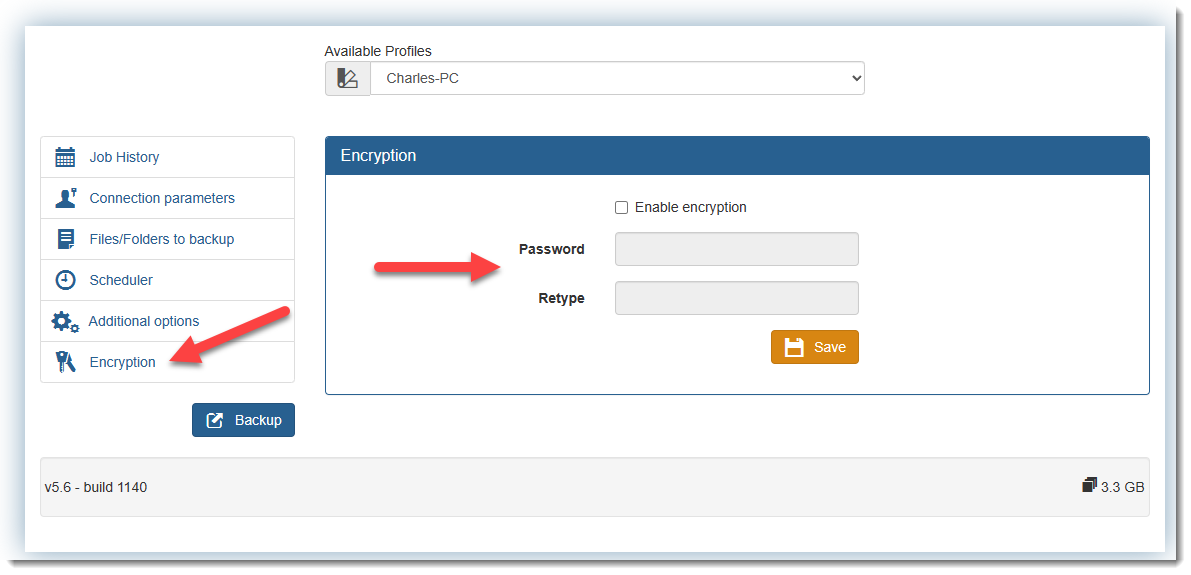
To use encryption simply click on the encryption tab, select the option for encryption and specify a password. The password cannot be more than 16 characters long. Refer to the image below.