Click Options under the Tools menu to bring up the following screen.
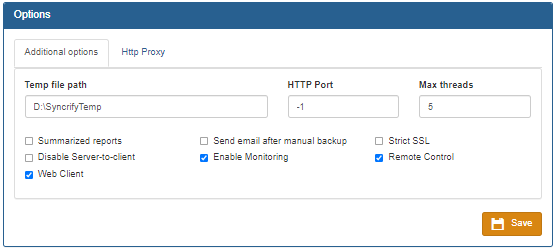
The following table define each individual field on this screen.
Temp file path |
The Accra Backup client creates temporary files during backup. By default, it uses the temporary folder designated by the operating system. Specify a path here to override this behavior and use an alternate location.
|
Summarized reports |
Accra Backup sends an email containing a list of files that are backed up after a backup job is complete. This email, by default, contains a list of every file that is backed up. When this checkbox is selected, Accra Backupwill send a summarized version of this report. This is useful when running a large backup.
|
Disable Server-to-Client |
On one hand the direction feature can be very useful; on the other hand, it can be dangerous if someone switches this direction by mistake. If you are confident your users will never run a backup using Server-to-Client direction, it can be disabled using this flag.
Note: Click here to disable Server-to-Client direction globally.
|
Send email after manual backup |
After a backup is complete, Accra Backup sends an email containing a list of files that are backed up. By default, this email is only sent when backup is run via the scheduler. Check this box to generate an email even for manual backups. |