How it works
Configuring SyncriBox is very easy - simply specify the server URL pointing to the Accra Backup Server, User ID and password. Create a SyncriBox folder into which you can drop the files you want to sync, SyncriBox folder you created and added to the configuration will automatically be synchronized with the server.
To add additional Sync Folders folders, simply drag-n-drop files from Windows Explorer or Finder on Mac OS X. To remove existing folders, hit the delete key.
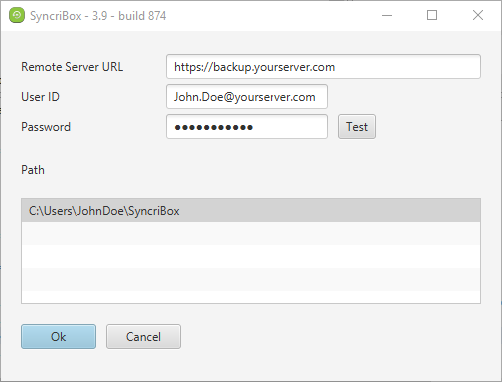
How is this different from Accra Backup Client
Underneath, SyncriBox is a special version of Accra Backup Client with the following difference:
•SyncriBox configures the parameters for the profile automatically. It set the direction to Two Way Sync( if an item is deleted on the PC but exist on the server the server will restore it on the PC), disables email notifications, VSS, and scheduling.
•Synchronization is triggered automatically when a file change is detected. Hence, no scheduling required.
•Profiles are mapped to users on the OS. For example, if there are 3 users on a machine, synchronization will be done using 3 independent profiles. UserA will not be able to see files belonging to UserB or UserC
•Encryption is used by default.
•Versioning is automatically enabled .
Other important facts
•SyncriBox can be installed on a client's machine without the regular Accra BackupClient. However, it won't be able to update itself if the Server-based Client is not installed on that machine. We recommend that both be installed for the automatic update feature.
•There is no extra cost of using SyncriBox. It rides on the same license that is used by Accra Backup Client Service.
•Previous versions of a file can only be restored from the server's web interface